

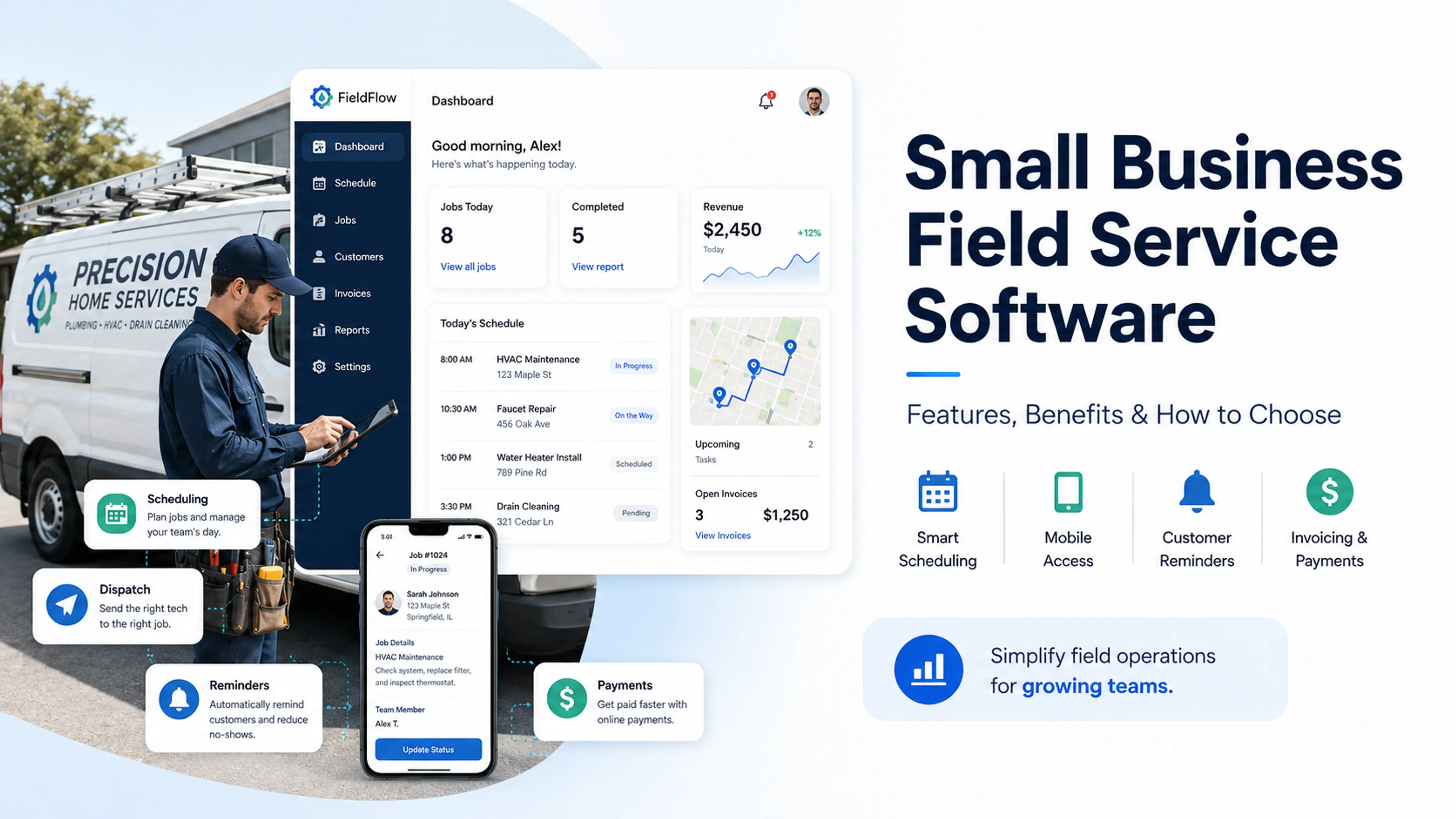
If you run a small field service business, your day probably starts before your technicians leave for their first jobs of the day. You have to confirm appointments, keep track of your technicians, and dispatch them to their respective jobs. You probably also have clients calling to ask when the tech will arrive, invoices waiting to be sent, and last-minute changes that can throw off your entire schedule.
That kind of work, without small business field service software, is manageable only if you handle a few jobs every week. However, once the business starts to grow and more clients start coming in, the spreadsheets, whiteboards, group chats, and your paper invoices start to fail you.
What happens next?
You often end up double-booking jobs. Sometimes you send the wrong technician to the wrong customer. Your customers keep calling you to ask if the tech is still going to be there. Plus, your payment processing time starts to take longer than expected.
This is where reliable field service software for small businesses steps in.
Field service management software helps small service businesses manage their fieldwork from start to finish. It takes care of everything, from the very first booking of the day to the final payment, all in one place.
Moreover, it gives smaller teams a simpler and more efficient way to schedule jobs, assign techs to those jobs, keep clients in loop, track job progress, pay techs, and get paid.
In this comprehensive guide, we will explain what field service software for small businesses actually does, which features you need to look for when deciding on a tool, how it helps day to day, and how to choose the perfect tool for your small team that they will actually use.
And if you are afraid of making the wrong choice, we will also tell you about the mistakes you need to avoid.
What Small Business Field Service Software Does
Your business can benefit significantly from a mobile field service management software that balances ease of use with operational control while automating your daily processes.
Field service management (FSM) brings everything under one roof. From scheduling jobs and dispatching techs to tracking job progress to communicating with clients and sending invoices, you can do everything in a single app. In other words, you do not need to reconcile your payments, calendar, and spreadsheets manually.
The question is, though: how does it actually work?
Let's take a look at what a typical day at work looks like for businesses that use a field service software for small business:
It starts with a customer booking a job online, or with someone from the team entering the job details in the app after a phone call or from the online booking page. From there, the job appears on the schedule board with the customer’s details, type, address, and preferred time slot. The manager can then assign the job to the right technician based on their skills, location, and availability.
Once the job is assigned, the tech can see the job on their phone. They know what the customer wants and where they need to go. As the tech makes progress on the job, the status updates in real time, so the manager also knows what is happening out there.
On the other hand, the client is also caught up on the progress. They receive job confirmations, reminders, and 'your technician is on the way’ messages. Once the job is done, the app also generates an invoice and sends it to the customer. As a result, the business collects its payment without waiting days.
The real benefit you get is straightforward: everyone in your office, including the techs and the management, is working using the same information, in a single dashboard, as the job moves from online booking to payment.
Key Features Small Businesses Should Look For
If you run an HVAC, cleaning, handyman, lawn care, pest control, plumbing, electrical, or appliance repair business and you frequently send your team out there, you need to be extra mindful of the features to look for in a reliable field service management app.
So, whether your focus is on visibility, built-in call tracking, inventory management, or a full-featured CRM, you should be aware of the nice-to-have features and must-have features:
A Clear Scheduling And Dispatching Board
Scheduling and dispatching are what make or break a small-business field service software. A well-designed calendar allows you to view the day ahead. So, at a glance, you already know which jobs are booked, which tech is assigned to which job, where each tech is going, and whether you have any open slots to accommodate urgent requests.
For a small team of cleaning professionals, this feature is important because one scheduling mistake can completely disrupt your entire schedule. A simple mistake like a double-booking, a missed appointment, or an incorrect job assignment can turn into frustrated clients and lost time. We advise looking for a simple drag-and-drop scheduling board to help you move jobs around and dispatch the techs.
Mobile Access For Field Teams
Your techs do not spend their days at their desks. They drive from job to job, reach out to customers, take notes, and record their progress. These are all the reasons why mobile access is non-negotiable.
Good mobile field service management software comes with an app that has all the details your techs might need during the day. This includes customer information, addresses, service history, job requirements, directions, progress status, payment collection, and additional notes.
This saves you time, so look for an easy-to-use app.
If it is clunky, drop it.
Work Order Management With All Details In One Place
A work order is the complete record of a job, from requirements to completion. For a small cleaning business, this comes in handy because too many details often live in too many places.
A good work order management system keeps customer notes, site photos, customer requests, progress updates, and job history together. This allows you to view a job's status without calling multiple people for context.
Customer Notifications That Reduce No-Shows
How you communicate with your customers is one of the simplest ways to leave a mark. Automated confirmation messages, regular reminders, “your tech is on the way to you” messages, and any delay updates help your clients know what to expect without calling you multiple times.
This feature is important because small businesses do not always have a specific person assigned to answering calls. Clear updates reduce confusion on both your end and your client’s end. This, consequently, reduces no-shows and makes your business appear more trustworthy in the eyes of your customer.
If you have a very small team of a few handymen, this may sound like something nice to have, but it quickly becomes mandatory once you start getting regular bookings.
Fast Invoicing And Payments
A job is only truly finished when the invoice is sent, and the payment is received. Your field service software should make it easy for you to generate invoices and collect payments as soon as the work is done.
For small teams, consistent cash flow keeps things going. Waiting several days can delay payments and increase workload. In a nutshell, the faster you generate an invoice, the faster you get paid.
Accurate Reporting And Analytics
Your small team of handymen does not need 50 dashboards. All you need is the basics: the number of jobs completed, the amount of revenue made, the number of jobs missed, and where time was lost.
It is useful to have accurate analytics, but reporting should be simple. For a small business, advanced analytics can look useful, but they are not essential.
Integrations With Accounting Or Other Tools
A mobile field service tool should fit into the way you already work. It should connect with Stripe, Google Calendar, QuickBooks, or any other tool that you use.
Integrations can be useful because they save time spent on double-entry. Your goal should be to reduce admin, not move it to a different screen.
Benefits Of Using Field Service Software
The biggest benefits of field service management software are not the technical aspects. It is the improvement in efficiency and productivity you get after switching to a software tool.
You notice faster jobs, a higher job completion rate, less admin load, fewer mistakes, improved customer loyalty, and better customer communication.
Saves Time On Manual Admin Work
Small teams often lose a lot of time on admin-related tasks. Typing customer details into the system, copying information between files, and using the same data for invoices all over again takes time. Field service software for small business decreases that back-and-forth by storing customer details, invoices, payments, job details, and tech schedules in one place. You do not have to rebuild your schedules manually or deal with job notes scattered across texts.
Reduces Scheduling Mistakes
Without a harmonized system, it becomes very easy to make mistakes. When the entire team is using the same data, it becomes easier to schedule jobs. With a field service management software, double bookings and missed appointments become less frequent because everyone can see who is assigned to which job. For small businesses, even a small mistake can throw everyone off balance.
Improves Customer Experience
People do not just want the job done. They also want to be informed. Customer experience matters. Automated confirmations, regular reminders, progress updates, and professional invoices make your business feel more reliable. A good experience can increase customer loyalty and lead to repeat bookings, better reviews, and increased referrals.
Helps Teams Work Faster In The Field
Your techs will work better when they have access to accurate information before they arrive on site. With proper job details, including the customer's requirements, job history, special directions, and progress reports on their phones, they do not have to call the office anymore. This results in less back-and-forth and more time spent on completing jobs.
Supports Growth Without Adding Chaos
You can only efficiently manage a few jobs with a manual system. When the business grows, the administrative tasks grow exponentially. The right FSM software can help you scale your business without increasing the paperwork. It allows you to grow your operation without getting caught up in manual scheduling, follow-ups, and invoicing.
How To Choose The Right Software For A Small Business
Choosing small business field service software is not about buying the tool with the most features or the highest price.
Your goal should be to find a tool that solves your biggest problems without creating new ones:
Match Features To Your Biggest Daily Problems
Before you even look at features, identify the problems that are costing you the most money or time. If you keep double booking jobs, visibility should be your priority. If the day falls apart because your team fails to assign jobs, look for scheduling boards and dispatch tools. If cash flow is your pain point, prioritize invoicing and payments.
Look For Ease Of Use And Fast Setup
A small team does not have the time and energy to adapt to a steep learning curve. If setup takes weeks or if your team needs multiple training sessions to learn the basics, the software is probably too clunky for you.
Go for a tool that comes with an easy setup. Software built for small businesses, like Calday, will help you go live in minutes or hours, not weeks.
Check Whether It Fits Your Budget And Team Size
You should not pay hundreds of dollars for a team of 1-15 people. Enterprise modules can get expensive, especially if they charge per user, per module, or for features you do not need. Your plan should match the size of your team.
Make Sure It Can Grow With Your Business
The right software should last you for a while. It should be adaptable and scalable. You should not need to switch to an enterprise system after a few months, but your business should also not outgrow your system after a few months.
Prioritize Tools Your Team Will Actually Use
The best tool is the one your employees use every day. If your techs think that the app is too clunky, they will not update job statuses. If the office admin finds the calendar to be too confusing, they will still dispatch jobs via text. So, choose software that can become a part of your team's daily routine.
Common Mistakes To Avoid
Choosing a reliable field service software for small business is not that hard if you know what mistakes to avoid. The wrong software can create more work for your admin team, confuse your techs, and lock you into features your business never needed in the first place.
Choosing Software With Too Many Unnecessary Features
It is easy to be impressed by enterprise modules that come with 47 features, advanced dashboards, dozens of add-ons, and complex workflows. However, a crew of up to 15 people does not need those features. The more features you choose, the more time and energy you have to spend on setting it up and training your employees. It also means that there will be more ways for your team to get lost. Buy the module that your business actually needs, not the one that looked the best in a sales demo.
Ignoring The Mobile Experience
Your techs will use the software on the mobile app from their phones, not from their desks.
If the mobile application is hard to configure, takes forever to load, and is cluttered, your techs will avoid it and stick to their group chats.
So, give the mobile app a test run before you commit. Pay special attention to the features your techs will actually use during the day: customer details, directions, progress report, notes, invoicing, and payments.
Overlooking Customer Communication Tools
Small businesses win their customers' trust with their seamless service delivery. Automated confirmations, timely reminders, “your tech is on the way” messages, and rain checks help customers stay updated without having to text or call. Skipping these features can lead to miscommunication, double-bookings, and no-shows.
Forgetting To Think About Future Growth
You must plan for future scalability. A software tool that works for a crew of 4 people may stop working when new people join the team. Obviously, you do not need an enterprise system in the beginning, but you do need a tool that is scalable. So look for something that can handle a busier calendar, more techs, more jobs, and a heavier workload.
Picking A System That Creates More Work Instead Of Less
The whole point of buying a field management service software is to remove repetitive admin tasks. If your tool adds more steps, more data, and more tasks to do without replacing your existing workload, it is not helping you. The right software should make dispatching, scheduling, invoicing, and payments easier for you.
Bring Every Job Into One Clear Workflow
The best small business field service software is not the one with the most complex dispatch dashboard or the most extensive feature list. It is the one that solves your problems, the one your team faces every single day. It gets rid of messy scheduling, confused dispatching, double booking, missed appointments, slow invoicing, and too much tedious admin work once the job gets done.
For a small service business, whether it is a team of 3 or 10 people, the right software should be simple, easy to use, and most importantly, easy to understand and add to your daily routine. It should help your team schedule jobs, assign techs to suitable jobs, keep your customers in the loop, send invoices, and collect payments without needing a complicated setup process or long training sessions.
That is why small businesses should look for tools built around real field service work, not scaled-down enterprise systems with extra features that look fancy but will never be used.
CTA: Still managing jobs through group chats, spreadsheets, and paper invoices? Calday gives small service teams one simple place to schedule, dispatch, remind customers, and get paid.
Start free. No credit card, no demo call required.